
20 AI Tools Every Professional Should Know in 2026
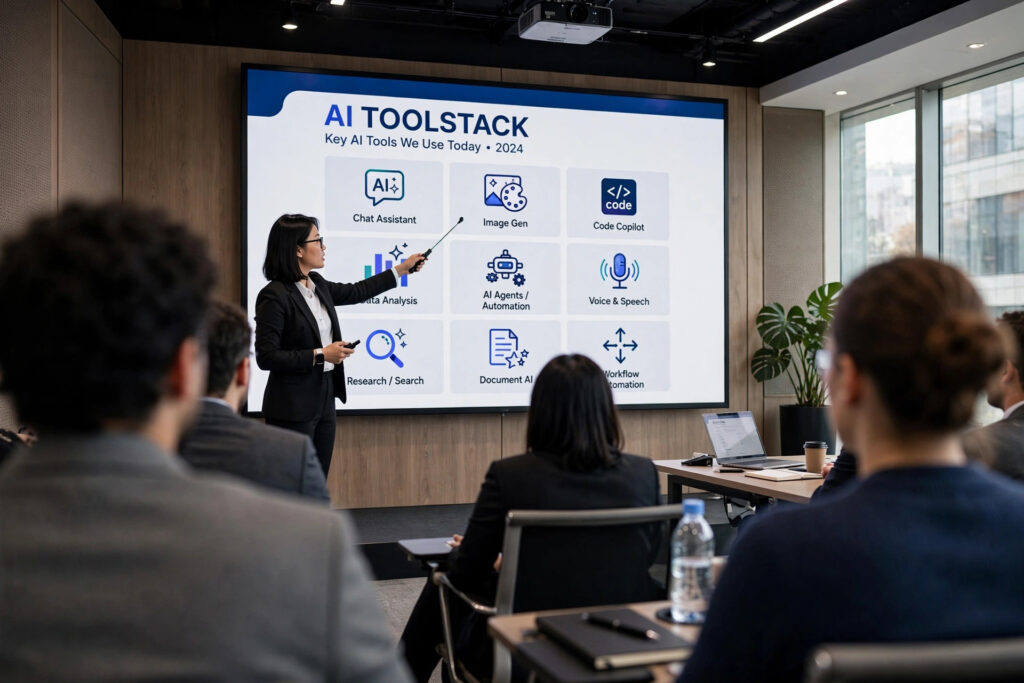
Artificial intelligence (AI) has quietly become part of the modern workday, and the right AI tools for professionals can shave hours off almost any task. Whether you’re drafting a report, coding a feature, or prepping for a client meeting, there’s likely an AI assistant built for the job. The challenge isn’t finding an AI tool anymore it’s knowing which ones are actually worth your time. Below are 20 AI tools every professional should know, organized by what you’re actually trying to get done.
Top AI Chatbots and Writing Assistants
ChatGPT: remains the go-to AI assistant for drafting emails, brainstorming ideas, and summarizing dense material quickly.
Claude: built by Anthropic, is favored for reviewing long documents and producing structured, well-reasoned analysis.
Google Gemini: works best inside Google Workspace, drafting content directly in Gmail, Docs, and Sheets.
Microsoft Copilot: lives inside Word, Excel, and Teams, making it a natural fit for Microsoft 365 users.
Grammarly: polishes tone and clarity in real time, catching issues most spellcheckers miss.

Best AI Research Platforms for Knowledge Work
Perplexity: pairs conversational search with real-time citations, cutting down manual research time significantly.
Notion AI: organizes notes, meeting recaps, and project docs while answering questions from your own workspace.
Leading AI Coding Assistants for Developers
GitHub Copilot: suggests code as you type and remains a staple for professional developers.
Cursor: has grown into a full agentic coding environment, handling multi-step development tasks with minimal hand-holding.

Top AI Design and Creative Software
Canva AI (Magic Studio): lets non-designers generate social posts, presentations, and marketing visuals in minutes.
Adobe Firefly: integrates directly into Creative Cloud for commercial-safe image generation and editing.
Midjourney: produces the most visually striking AI artwork, ideal for campaigns needing a distinct creative edge.
AI Tools for Meetings and Daily Productivity
Otter.ai: transcribes meetings and lets you search across past conversations for key decisions.
Fathom: records and summarizes video calls automatically, syncing notes straight to your CRM.
Wispr Flow: turns spoken words into clean, corrected text across any app handy for professionals who think faster than they type.

Best AI Automation Platforms for Workflows
Zapier: connects thousands of apps, letting AI agents handle repetitive multi-step tasks without code.
n8n: offers similar automation with self-hosting options, appealing to teams with strict data privacy needs.
AI-Powered Project Management Tools
Motion: builds your team’s daily schedule automatically, factoring in deadlines, priorities, and dependencies.
ClickUp AI: summarizes tasks, drafts updates, and generates reports directly inside your existing project boards.

AI Voice and Audio Production Tools
ElevenLabs: generates natural-sounding voiceovers and supports multilingual content without needing a native speaker.
Descript: edits video and audio by editing a transcript delete a word, and it disappears from the recording too.
How to Choose the Right AI Tools for Professionals Like You
The best AI tools for professionals are the ones that solve a real bottleneck, not the ones with the flashiest launch video.
Final Thoughts: Your Next Move With AI
Here’s the truth nobody tells you in these roundup posts: the professionals pulling ahead right now aren’t the ones who installed all 20 tools on this list. They’re the ones who picked two or three, learned them properly, and let everyone else keep chasing the next shiny release. AI isn’t a competition to collect the most logins it’s leverage, and leverage only works once you actually pick it up.
So don’t close this tab and forget about it. Open one tool from the list above the one tied to your biggest time-suck this week and use it on something real before the day is out. That’s the only step that actually moves the needle. Bookmark this guide, come back when your workflow changes, and keep building a stack that works for you instead of against you.
Frequently Asked Questions (FAQ)
What is the most useful AI tool for professionals?
It depends on your role, but ChatGPT and Claude are the most broadly useful for writing, research, and analysis across industries.
Are AI tools safe for handling business data?
Most reputable AI tools offer enterprise-grade privacy settings, but always review a tool’s data policy before uploading sensitive information.
Do I need to pay for AI tools to see real productivity gains?
No. Many tools, including ChatGPT, Canva AI, and Otter.ai, offer free tiers that are useful before upgrading to a paid plan.
How many AI tools should a professional actually use?
Most professionals see the best results from 3–5 well-chosen tools rather than trying to adopt every new release.