100 ChatGPT Prompts: A Complete Guide for all to Boost Productivity

The right prompt can turn ChatGPT from a chatbot into a practical work assistant that helps you plan, write, research, organize, and decide faster. This guide shares ChatGPT Prompts for Productivity including ready-to-copy instructions for professionals, students, freelancers, and bloggers. Instead of offering vague one-line commands, each prompt includes context, a clear outcome, and useful constraints, so you receive focused answers with less editing.
However, prompts do not create productivity automatically. You still need to provide accurate information, review important claims, and apply professional judgment before using the output. Therefore, treat ChatGPT as a capable first-draft partner rather than an unquestionable authority. When you combine clear prompting with human review, routine work becomes faster without sacrificing your voice or standards.
How ChatGPT Productivity Prompts Save Time
Moreover, A useful prompt reduces the repeated explanation normally required before someone can help with a task. For example, instead of asking ChatGPT to “write an email,” you can define the recipient, purpose, tone, key facts, desired action, and maximum length. Consequently, the first response becomes closer to something you can actually send.
Moreover, OpenAI’s official guidance recommends clear instructions, adequate context, and iterative refinement. In other words, strong prompting is not about discovering a secret phrase. It is about communicating the task as you would explain it to a capable colleague.
For an additional foundation, read my guide on how to write better AI prompts. You can also explore the best AI tools for productivity and these time-saving AI hacks for broader workflow ideas.
Transparent Methodology Behind This Prompt Collection
Instead of relying on random instructions, this collection follows a repeatable editorial framework. First, every prompt needed to solve a recognizable task. Next, each prompt was reviewed against five practical checks: task clarity, useful context, output structure, customization ease, and fewer follow-up questions. As a result, the final collection is more consistent, practical, and easier to apply across different productivity workflows.
Additionally, the prompts avoid guarantees about saving a fixed number of hours because results depend on task complexity, user experience, input quality, and review requirements. Therefore, The examples below are reusable templates, not controlled scientific benchmarks. Therefore, your results may differ across models, settings, files, and conversation history.
Same-Task Comparison: Weak Prompt Versus Structured Prompt
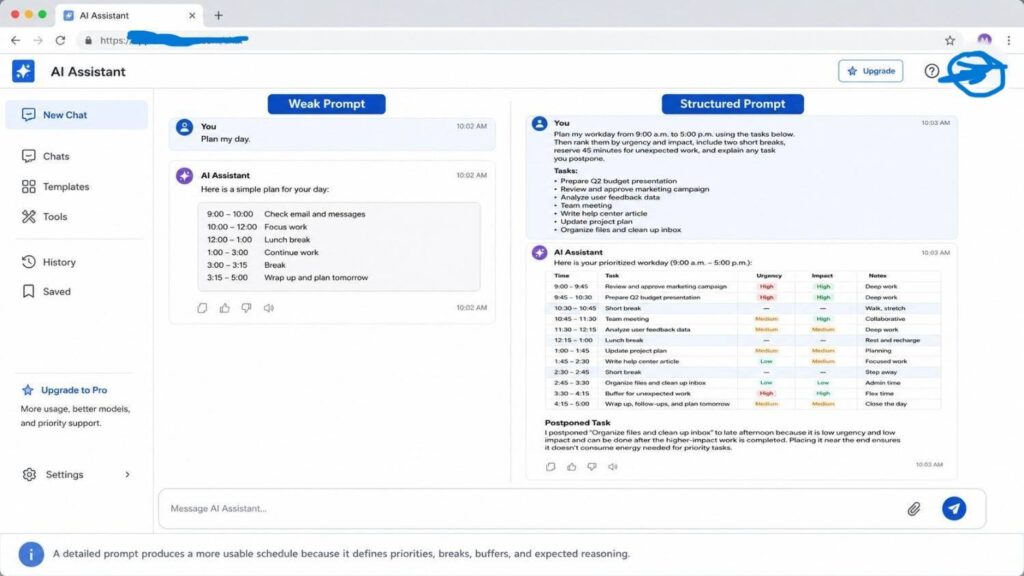
Consider a common task: planning a busy workday.
| Version | Prompt | Likely result |
|---|---|---|
| Weak | “Plan my day.” | A generic schedule based on assumptions, with limited awareness of deadlines or energy levels. |
| Structured | “Plan my workday from 9:00 a.m. to 5:00 p.m. using the tasks below. Then rank them by urgency and impact, include two short breaks, reserve 45 minutes for unexpected work, and explain any task you postpone.” | A schedule with priorities, buffers, reasoning, and fewer revisions. |
However, The structured version works better because it specifies time, inputs, priorities, constraints, and the expected format. Nevertheless, even a detailed prompt may require refinement after you see the first answer. For that reason, follow-up instructions such as “make the schedule less ambitious” or “move creative work to the morning” remain valuable.
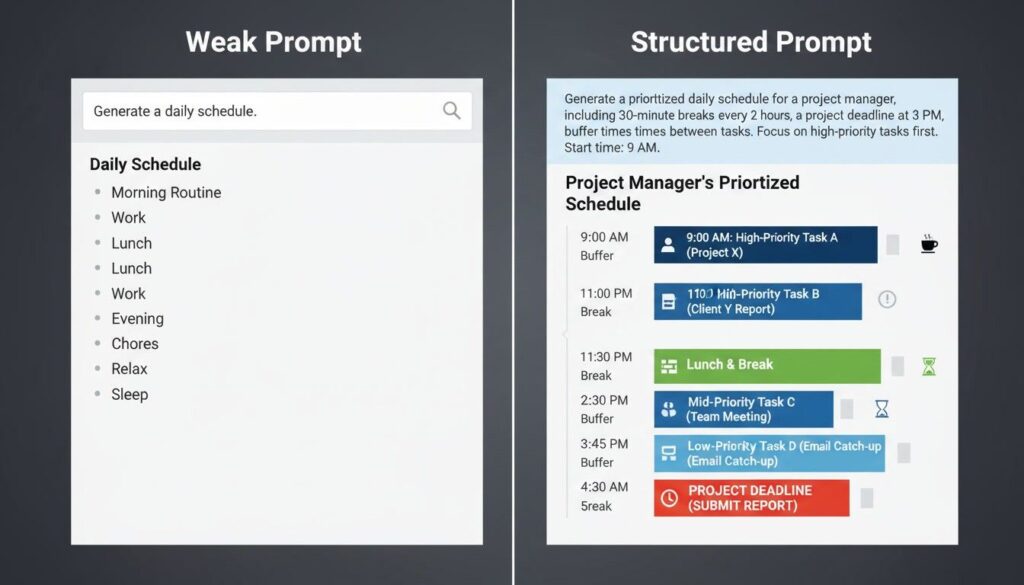
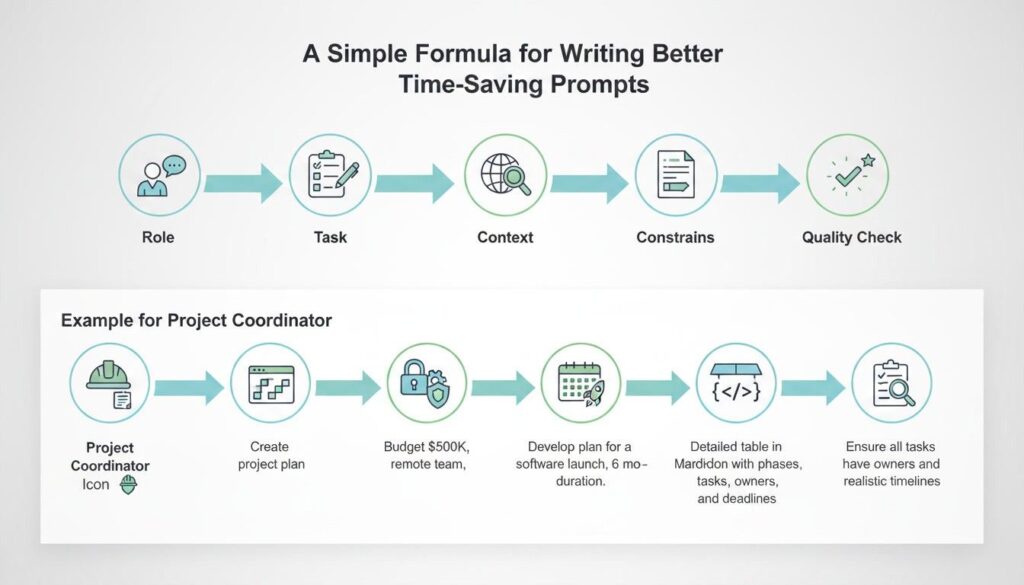
A Simple Formula for Writing Better Time-Saving Prompts
Before using the list, remember this formula like as:
Role + Task + Context + Constraints + Output format + Quality check
For example: “Act as a project coordinator. Turn these notes into a weekly action plan for a five-person marketing team. Group tasks by owner, include deadlines, flag dependencies, and finish with three questions about missing information.”
Although every prompt does not need all six elements, adding the missing context usually improves relevance. Moreover, asking ChatGPT to identify uncertainty is often more useful than forcing it to produce a confident answer from incomplete information.
100 ChatGPT Prompts for Faster, More Focused Work
Replace the words inside brackets with your information. Additionally, remove any instruction that does not match your task, audience, or preferred working style.
Daily Planning and Priority Prompts

Prompts 1–10: Organize Your Day and Protect Focus
- “Create a schedule for today using these tasks: [tasks]. Rank them by urgency and impact, add breaks, and reserve [time] for unexpected work.”
- “Review my task list and identify the three activities that will create the greatest progress toward [goal]. Explain why the remaining tasks can wait.”
- “Turn this overwhelming project into small actions I can complete over [number] days. Then include dependencies, estimated effort, and a first step.”
- “Act as a productivity coach. Review how I spent yesterday: [details]. Identify time leaks and recommend three changes for today.”
- “Build a two-hour deep-work session for [task]. Next, divide it into stages, remove distractions, and include a five-minute review at the end.”
- “Create a weekly plan around these fixed commitments: [commitments]. Add work blocks for [priorities] without making the schedule unrealistic.”
- “Help me decide what to delegate, automate, postpone, or delete from this list: [tasks]. Then present the answer in a four-column table.”
- “Design a morning routine lasting no more than [minutes] that prepares me for [goal]. Keep each step actionable and explain its purpose.”
- “Convert these broad goals into measurable weekly outcomes: [goals]. Additionally, for each outcome, suggest one leading indicator and one completion measure.”
- “Create an end-of-day review template covering completed work, unfinished tasks, lessons, blockers, and tomorrow’s first priority. Keep it under ten questions.”
Email and Workplace Communication Prompts
Prompts 11–20: Write Clearer Messages With Less Editing
- “Draft an email to [recipient] about [topic]. Then include these facts: [facts], request [action], and keep the tone warm, direct, and concise.”
- “Rewrite this email so it sounds confident without becoming rude. Preserve every factual detail and keep the version below [word count]: [email].”
- “Turn these rough notes into a polite follow-up email: [notes]. Next, mention the previous conversation, restate the next step, and suggest a reasonable deadline.”
- “Write three subject lines for this email: [email]. Make one direct, one curiosity-driven, and one formal without using misleading language.”
- “Draft a respectful reminder about [deadline or payment]. However, acknowledge delays, state the consequence clearly, and request confirmation by [date].”
- “Shorten this message by 40 percent while preserving its meaning, dates, names, and requested action: [message]. Remove repetition and formality.”
- “Create a calm response to this difficult message: [message]. Then address the concern, avoid defensiveness, and propose one next step.”
- “Draft a team announcement about [change]. Explain what is changing, why it matters, when it begins, who is affected, and where questions should go.”
- “Turn this technical update into plain English for a nontechnical audience: [update]. Then use a short summary, key impact, and required action.”
- “Review this email for ambiguity, missing information, and tone risks: [email]. First, list the problems; then provide a corrected version.”
Meeting, Notes, and Follow-Up Prompts
Prompts 21–30: Make Conversations Easier to Act Upon
- “Create a 30-minute meeting agenda for [purpose]. Then include desired decisions, time allocations, preparation requirements, and an action-item review.”
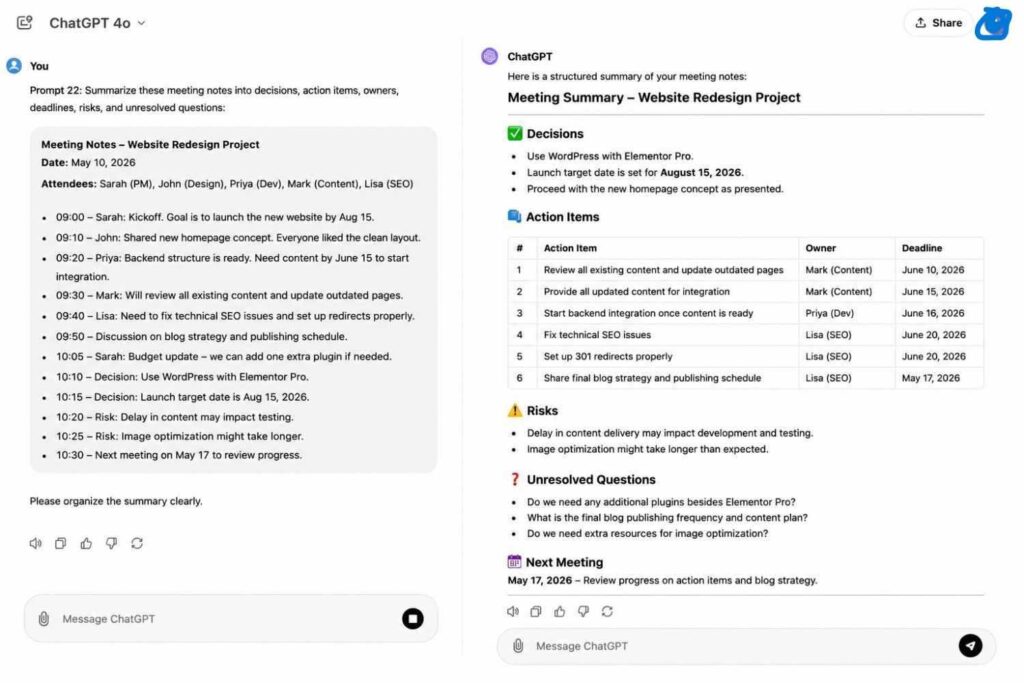
- “Summarize these meeting notes into decisions, action items, owners, deadlines, risks, and unresolved questions: [notes]. Do not invent missing details.”
- “Turn this transcript into an executive summary under 200 words. Next, highlight business impact, agreements, disagreements, and immediate next steps: [transcript].”
- “Prepare five questions for my meeting with [person or team] about [topic]. Prioritize questions that reveal blockers, costs, risks, and ownership.”
- “Convert these brainstorming notes into grouped themes, promising ideas, concerns, and recommended next actions: [notes]. Additionally, preserve unusual ideas instead of simplifying them away.”
- “Draft a meeting follow-up message that confirms decisions and assignments from these notes: [notes]. Ask recipients to correct anything inaccurate.”
- “Identify where this meeting agenda may waste time: [agenda]. Then recommend a shorter structure and explain which topics should move to written updates.”
- “Create a one-page decision memo from this discussion: [details]. Include background, options, trade-offs, recommendation, risks, and the required decision.”
- “Review these action items for unclear ownership or deadlines: [items]. Then rewrite each item so one person can understand exactly what completion means.”
- “Design a reusable weekly team check-in template covering progress, priorities, blockers, metrics, decisions, and support requests without encouraging reporting.”
Writing, Editing, and Content Improvement Prompts
Prompts 31–40: Produce Stronger First Drafts
- “Create an outline for a [content type] about [topic] for [audience]. Arrange sections and explain the purpose of each section.”
- “Rewrite this paragraph for clarity and natural flow while preserving my meaning and personal voice: [paragraph]. Avoid exaggeration, repetition, and generic filler.”
- “Edit this draft in two stages. First, list structural problems. Next, provide a polished version with stronger transitions and shorter sentences: [draft].”
- “Generate five opening hooks for [topic]. Then use different approaches, including a question, problem, surprising observation, promise, and short story.”
- “Turn these notes into a 600-word article for [audience]: [notes]. Include an introduction, examples, practical steps, and a conclusion.”
- “Review this content for unsupported claims, vague wording, missing examples, and reader objections: [content]. Suggest improvements without rewriting everything.”
- “Create three versions of this message for different audiences: beginner, experienced professional, and decision-maker. Keep the central facts unchanged: [message].”
- “Improve this call to action so it explains the reader benefit and next step clearly: [CTA]. Provide five alternatives without artificial urgency.”
- “Convert this long article into a LinkedIn post, email newsletter, and five social captions. Preserve the main insight while adapting each format: [article].”
- “Proofread this text for grammar, punctuation, consistency, and accidental repetition: [text]. Show a clean version followed by a brief change summary.”
Research and Learning Prompts
Prompts 41–50: Understand Information More Efficiently
- “Explain [topic] to a beginner using plain language, one analogy, and a short example. Then list three common misunderstandings.”
- “Create a research plan for answering this question: [question]. Identify primary sources, secondary sources, search terms, and verification steps.”
- “Compare these options using consistent criteria: [options]. Include advantages, limitations, best use cases, hidden costs, and questions I should investigate.”
- “Summarize this source without adding outside information: [text]. Then separate established facts, author opinions, assumptions, and unanswered questions.”
- “Teach me [skill] through a seven-day beginner plan. Then include one lesson, one exercise, and one measurable outcome for each day.”
- “Create a quiz from these notes: [notes]. Include ten questions, answers, explanations, and a mix of recall and application.”
- “Help me evaluate whether this claim is credible: [claim]. Next, show what evidence would support it, what could weaken it, and where verification is needed.”
- “Turn this complex material into a study guide with definitions, key concepts, examples, memory cues, and five review questions: [material].”
- “Identify knowledge gaps in my explanation of [topic]: [explanation]. Ask targeted questions before providing a corrected explanation.”
- “Create a comparison matrix for [topic] based only on these sources: [sources]. Cite which source supports each conclusion.”
Blogging and SEO Prompt Templates
Prompts 51–60: Plan Helpful, Search-Focused Content
- “Generate 30 blog ideas about [niche] for [audience]. Group them by search intent and identify which ideas suit beginner-focused content.”
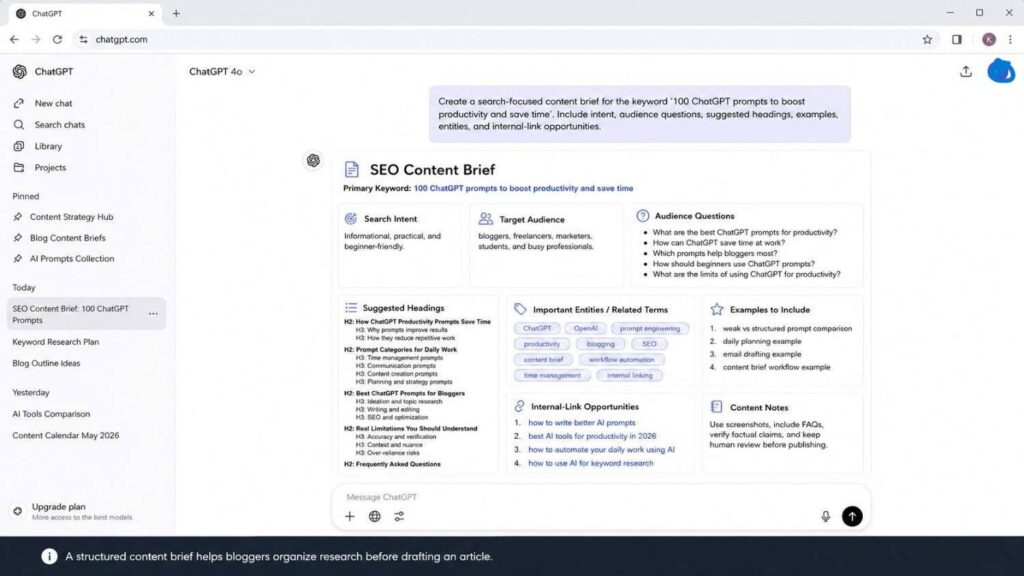
- “Create a search-focused content brief for the keyword [keyword]. Include intent, audience questions, suggested headings, examples, entities, and internal-link opportunities.”
- “Analyze this keyword list and group terms into logical topic clusters: [keywords]. Then select one primary keyword and supporting terms for each article.”
- “Review this outline for search-intent alignment: [outline]. Next, identify missing questions, weak sections, repetition, and opportunities for original examples.”
- “Write five SEO title options for [keyword]. Keep them clear, accurate, benefit-focused, and readable without keyword stuffing or exaggerated claims.”
- “Create a meta description for [page topic] using [keyword] naturally. Keep it concise, describe the benefit, and avoid promises the page cannot support.”
- “Suggest five relevant internal links for this draft using the following URLs: [URLs]. Then recommend natural anchor text and exact placement.”
- “Audit this article for helpfulness, originality, factual support, readability, and excessive AI-style phrasing: [article]. Finally, prioritize changes with the greatest reader benefit.”
- “Create an FAQ section for [topic] based on reader concerns. Provide answers and flag any question requiring external verification.”
- “Turn my experience with [tool or process] into an evidence-based review structure. Include methodology, test tasks, screenshots, limitations, pricing, and recommendations.”
For a complete workflow, connect these prompts with my guide on using AI for keyword research and my beginner article explaining how AI can help you start a blog.
Project Management and Teamwork Prompts
Prompts 61–70: Convert Goals Into Accountable Work
- “Create a project plan for [project] ending on [date]. Then include milestones, tasks, owners, dependencies, risks, and weekly review points.”
- “Turn this project scope into a work breakdown structure: [scope]. Separate deliverables, tasks, subtasks, acceptance criteria, and out-of-scope requests.”
- “Review this deadline plan for unrealistic assumptions: [plan]. Next, identify bottlenecks, missing dependencies, resource conflicts, and safer alternatives.”
- “Create a RACI matrix for this project: [details]. Define who is responsible, accountable, consulted, and informed for each activity.”
- “Draft a weekly status report from these updates: [updates]. Include progress, metrics, risks, decisions needed, next steps, and support requests.”
- “Convert these stakeholder comments into prioritized requirements: [comments]. Then separate essential needs, preferences, contradictions, and questions requiring clarification.”
- “Create a risk register for [project]. Then include probability, impact, warning signs, mitigation actions, contingency plans, and risk owners.”
- “Help me prepare for a project delay conversation. Summarize the cause, impact, recovery plan, revised date, and decisions needed from stakeholders.”
- “Design a project retrospective covering what worked, what failed, lessons, process changes, and assigned follow-up actions. Keep the questions constructive.”
- “Compare two project approaches: [approach A] and [approach B]. Evaluate speed, cost, quality, risk, flexibility, and team capacity before recommending one.”
Spreadsheet, Data, and Analysis Prompts
Prompts 71–80: Turn Raw Information Into Useful Decisions
- “Review this spreadsheet structure: [columns and purpose]. Identify missing fields, duplicate information, validation rules, and formulas that could reduce manual work.”
- “Explain what these data columns mean and suggest a cleaning process: [columns and sample rows]. Flag ambiguous values instead of guessing.”
- “Create an Excel or Google Sheets formula for [task]. Explain the formula in plain language and provide a version that handles blank cells.”
- “Analyze this dataset summary: [data]. Identify patterns, anomalies, limitations, and questions that should be answered before deciding.”
- “Turn these figures into a management-ready narrative: [figures]. Explain what changed, why it may matter, and which claims require further evidence.”
- “Design a dashboard for [goal] using these available metrics: [metrics]. Recommend sections, charts, filters, update frequency, and decision-making use.”
- “Create a data-quality checklist for [dataset]. Cover completeness, consistency, duplicates, outliers, date formats, source reliability, and privacy concerns.”
- “Help me choose the best chart for this message: [message and data]. Compare suitable chart types and explain which one communicates most clearly.”
- “Convert this unstructured information into a clean table with columns for [fields]: [information]. Mark missing values as ‘Not provided’ rather than inventing them.”
- “Write step-by-step instructions for repeating this analysis monthly: [process]. Include required files, formulas, quality checks, and reporting steps.”
Automation and Repetitive-Work Prompts
Prompts 81–90: Identify Workflows Worth Streamlining
- “Map this recurring process from start to finish: [process]. Next, identify repetitive steps, decision points, handoffs, delays, and automation opportunities.”
- “Evaluate whether this task should be automated: [task]. Compare frequency, time cost, error risk, setup effort, maintenance, and privacy concerns.”
- “Create a no-code automation plan connecting [app A] and [app B] for [goal]. Define trigger, actions, conditions, exceptions, and testing steps.”
- “Turn this manual standard operating procedure into an automation-ready workflow: [procedure]. Separate rules, human judgments, inputs, outputs, and failure handling.”
- “List ten repetitive activities in a typical [role] workflow. Rank them by automation potential and recommend a safe starting point.”
- “Design a quality-control checklist for an automated [process]. Include data validation, human approval, error alerts, logging, and rollback procedures.”
- “Create a reusable prompt template for processing [type of request]. Include required inputs, decision rules, output format, and escalation conditions.”
- “Help me automate a weekly report using these sources: [sources]. Describe the workflow, required permissions, review stage, and distribution process.”
- “Identify which steps in this workflow should remain human-controlled: [workflow]. Consider judgment, sensitivity, compliance, customer impact, and irreversible actions.”
- “Create a small pilot plan for automating [task]. Define scope, success measures, test data, responsible person, risks, and a two-week review.”
For deeper implementation ideas, see how to automate your daily work using AI.
Decision-Making, Career, and Business Prompts
Prompts 91–100: Think More Clearly Before Taking Action
- “Help me evaluate this decision: [decision]. Clarify my goal, compare options, expose assumptions, identify risks, and recommend the next information to gather.”
- “Create a weighted decision matrix for these options: [options]. Suggest criteria, ask me to assign weights, and avoid choosing before receiving my priorities.”
- “Act as a skeptical reviewer of this business idea: [idea]. Identify customer problems, evidence gaps, costs, alternatives, risks, and a small validation test.”
- “Prepare me for an interview for [role]. Generate questions, strong answer structures, examples I should prepare, and thoughtful questions for the employer.”
- “Rewrite these career achievements into resume bullets: [achievements]. Use actions and outcomes without inventing numbers or overstating responsibility.”
- “Create a 30-day development plan for improving [skill]. Include weekly objectives, practice tasks, feedback methods, and measurable evidence of progress.”
- “Review this client proposal for clarity, scope, pricing logic, risks, and unanswered questions: [proposal]. Suggest revisions that build trust without overselling.”
- “Develop an offer for [audience] who struggle with [problem]. Define deliverables, boundaries, process, proof needed, and an ethical call to action.”
- “Turn this business goal into a quarterly execution plan: [goal]. Include outcomes, initiatives, owners, milestones, metrics, risks, and review dates.”
- “Conduct a pre-mortem for this plan: [plan]. Assume it failed, identify causes, and recommend preventive actions before execution begins.”
Beginner Recommendation: Start With Five Prompts
However, Beginners should not copy all one hundred prompts into different chats immediately. Instead, choose one repeated task from your real week and improve that workflow first. A starter set includes Prompt 1 for daily planning, Prompt 11 for email, Prompt 22 for meeting notes, Prompt 31 for outlines, and Prompt 91 for decisions.
Use each prompt three times with real but non-sensitive information. After every answer, note what was missing, unclear, or unnecessarily long. Then add one follow-up instruction that corrects the problem. Consequently, you will learn how ChatGPT responds while building reusable templates based on your actual needs.
Therefore, The Free plan can support this learning process, although limits apply to messages, uploads, image creation, data analysis, and some advanced capabilities. Check the current pricing page before publishing or purchasing because features and limits can change.
Blogger Recommendation: Build a Human-Reviewed Content Workflow
For bloggers, the strongest prompts are not those that generate a complete article in one click. Instead, use ChatGPT in separate stages for audience research, keyword clustering, outlines, source questions, first-draft support, editing, internal links, FAQs, and repurposing. So, This staged approach gives you more control over quality and makes it easier to add personal experience, original screenshots, and verified information.
A blogging sequence uses Prompt 42 for research planning, Prompt 52 for the content brief, Prompt 54 for intent alignment, Prompt 58 for the helpfulness audit, and Prompt 60 for review methodology. Moreover, always verify prices, product features, statistics, laws, and medical or financial claims through reliable current sources.
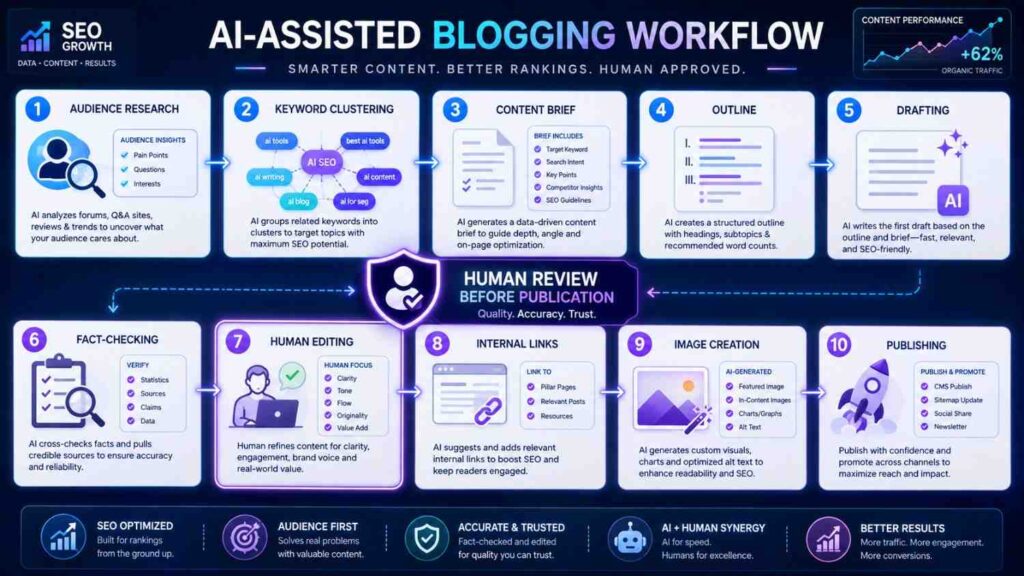
However, Google states that generative AI can help with research and content structure, but mass-producing pages without added value may violate its scaled-content policies. Google also emphasizes accuracy, quality, relevance, and people-first usefulness. Therefore, bloggers should treat AI output as working material that requires expertise, verification, and editorial improvement.
Free and Paid ChatGPT Productivity Stacks
Free Stack for Personal Productivity
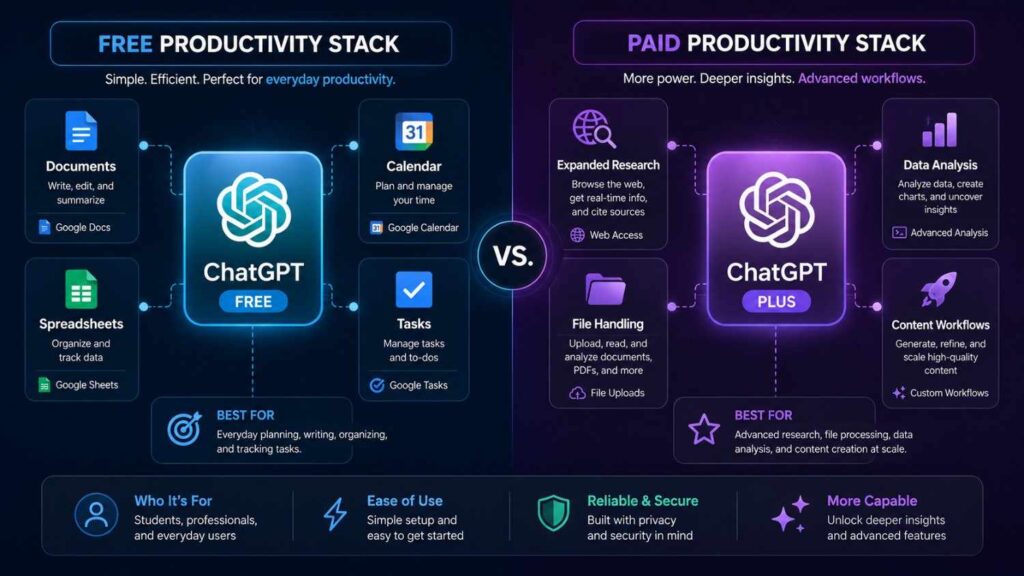
To begin, start with ChatGPT Free, Google Docs, Google Sheets, Google Calendar, and a reliable task manager. First, use ChatGPT for planning and drafting. Next, use Google Docs for writing, Google Sheets for structured tracking, and Google Calendar for time blocking. Meanwhile, your task manager can help you monitor deadlines and maintain accountability. As a result, this simple combination allows you to improve prompt design, organize recurring tasks, and build efficient workflows without purchasing several AI subscriptions.
However, free access usually comes with tighter limits on messages, file uploads, image generation, deep research, memory, and data analysis. Therefore, save your most useful prompts in a separate document so you can reuse them quickly. Additionally, prepare your information before opening a new conversation, and combine related requests whenever possible. Consequently, you can use the available limits more efficiently while still receiving focused and practical results.
Paid Stack for Professionals and Bloggers
As of August 6, 2026, ChatGPT Plus is listed at US$20 per month. It provides broader model and tool access than Free, although usage limits can still vary. ChatGPT Go is listed at US$8 monthly in the United States, with localized pricing in some markets. Moreover, OpenAI also lists Pro tiers at US$100 and US$200, providing five times or twenty times the Plus usage allowance respectively. Taxes, currency conversion, regional availability, and app-store billing may affect the amount.
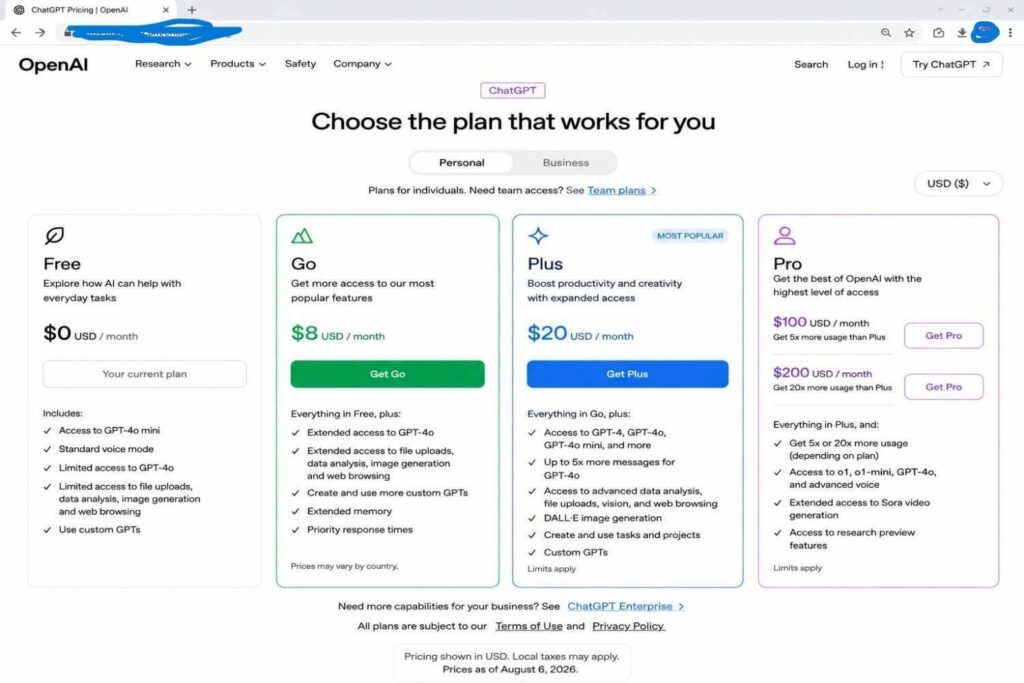
For most individual bloggers, marketers, and freelancers, Plus is the sensible paid starting point because it expands access without requiring a power-user budget. In contrast, Pro is more appropriate when higher limits, advanced research, coding, image creation, or intensive daily workflows create measurable value. So, Before upgrading, track where the Free plan interrupts your work and calculate whether the saved time justifies the recurring cost.
Real Limitations You Should Understand
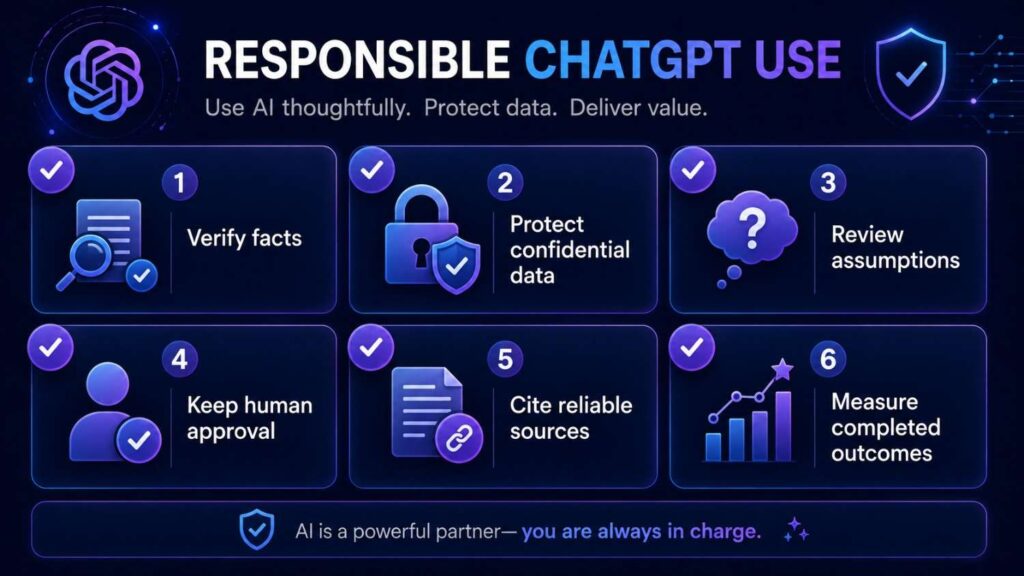
First, ChatGPT Prompts for Productivity can still produce incorrect, incomplete, or outdated information in confident language. Therefore, always verify claims involving money, health, legal responsibilities, safety, reputation, or important business decisions.
Second, the quality of ChatGPT Prompts for Productivity depends heavily on the information and context you provide. Even a detailed prompt cannot recover missing facts, while a polished response may still contain weak assumptions. Consequently, ask ChatGPT to identify uncertainty, missing details, and verification requirements before finalizing the work.
Third, use ChatGPT Prompts for Productivity carefully when handling sensitive or confidential information. Avoid sharing passwords, private student records, client data, unpublished financial details, or personally identifiable information unless your organization has approved the platform and workflow. Additionally, review ChatGPT’s Data Controls and workplace policies before uploading files.
Fourth, ChatGPT Prompts for Productivity should save time rather than encourage endless prompt editing. Once a prompt produces an accurate and acceptable draft, complete the task instead of repeatedly optimizing the instructions. Moreover, save successful prompt templates so you can reuse them without rebuilding the same workflow every week.
Finally, ChatGPT Prompts for Productivity should support your expertise rather than replace your professional judgment, relationships, or accountability. ChatGPT can prepare options, summarize information, and reduce repetitive writing. Nevertheless, you remain responsible for decisions, factual accuracy, ethical use, and the final outcome.
Frequently Asked Questions About Productivity Prompting
1. What are the best ChatGPT prompts for productivity?
The best prompts address a recurring task and specify context, constraints, and output format. Strong starting points include planning, emails, meeting summaries, research, and decisions.
2. Can ChatGPT really save time at work?
Yes.Obviously. It can accelerate first drafts, organization, summaries, brainstorming, and formatting. Actual savings depend on complexity, input quality, review needs, and reuse.
3. How should beginners use these prompts?
Start with one repeated task, test the prompt, and refine it from real results. Avoid sensitive information and verify claims before acting.
4. Which ChatGPT plan is best for bloggers?
Free suits learning and occasional tasks. Plus generally fits individual bloggers needing broader access, while Pro targets demanding, high-volume use.
5. Can I use ChatGPT prompts for SEO content?
Yes.Of course, Prompts support clustering, briefs, outlines, FAQs, internal links, and editing. Still, validate search data, check facts, and add original experience.
6. Will these prompts guarantee better answers?
No. Strong prompts improve relevance, but model behavior, available context, source quality, and task difficulty still affect results.
7. How often should I update my saved prompts?
Review prompts when your workflow, audience, tools, or standards change. Otherwise, a quarterly check can remove outdated instructions and capture lessons.
8. Is it safe to publish ChatGPT-generated content?
Publication requires human review. Check accuracy, originality, citations, tone, privacy, and reader value. Add examples, screenshots, interpretation, and reliable sources.
Final Thoughts
Finally, these ChatGPT Prompts for Productivity become most valuable when they are integrated into a thoughtful and repeatable workflow. To begin, identify one problem that regularly consumes your attention. Then, choose the most relevant prompt, replace the placeholders with accurate details, and review the first response carefully. Afterward, refine the instruction based on what was missing, unclear, or unnecessarily detailed.
Moreover, measure the value of ChatGPT Prompts for Productivity through completed outcomes rather than attractive-looking text. For example, a decisive email, an accurate meeting summary, or a risk-aware project plan delivers greater practical value than a polished response that does not support action. Therefore, focus on whether the output helps you complete meaningful work more clearly, quickly, and confidently.
Ultimately, use ChatGPT Prompts for Productivity to reduce repetitive effort while keeping human judgment at the center of every workflow. First, provide clear context and request a structured output. Next, verify important facts, review assumptions, and correct any missing information. Most importantly, preserve your authentic experience and professional perspective before using or publishing the final result.